
Barcode Colors & Contrast
Black bars on a white or light background remain the safest choice for lasers and imagers.
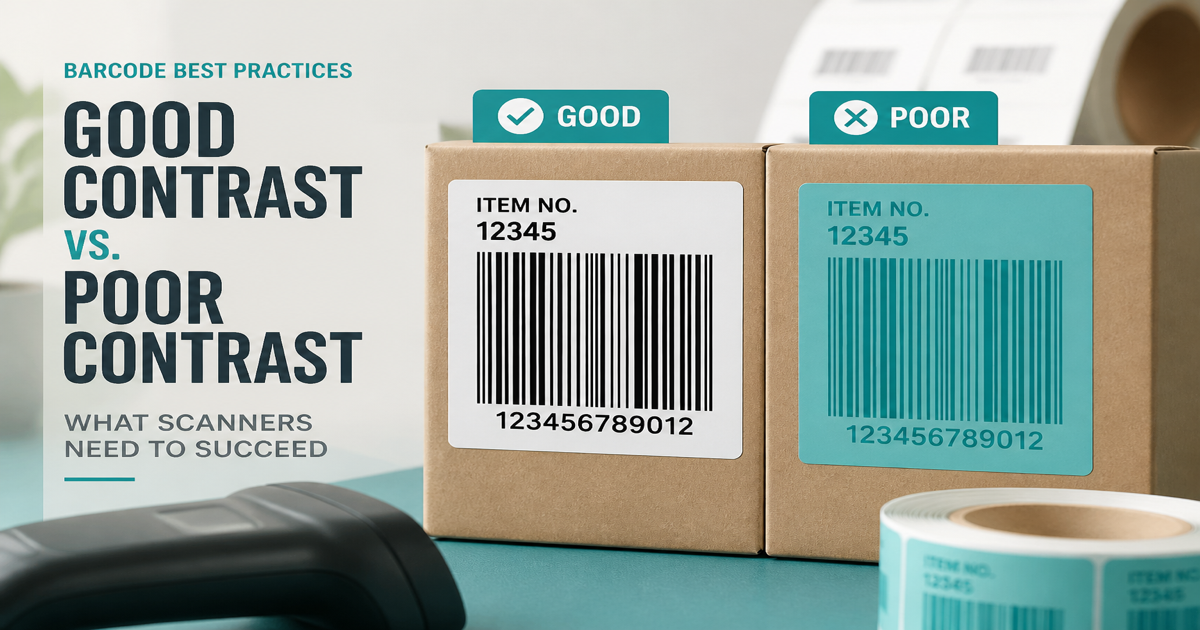
Barcodes depend on reflectance, not designer taste. A red barcode on a white box may look on-brand but fail because many laser scanners read red light and cannot distinguish red bars from the background. Generate high-contrast artwork with the Barcode Generator and test real prints in the barcode scanner.
Why it matters
Scanners measure the difference in light reflected from bars versus spaces. GS1 guidance traditionally specifies dark bars on a light background, with bars appearing black or blue-black to red laser diodes. Inverted codes, pastel bars, metallic foils, and transparent films on colored bottles are frequent audit failures. Imagers are more flexible than older lasers, but trading partner specs often still mandate classic contrast. Read printing barcodes and barcode verifiers when you chase ISO grades on colored packaging.
How to apply it
Specify bar and background colors in print specs as L*a*b* or density targets, not only Pantone names, and require press proofs on the actual substrate.
- Default to black bars on white or light neutral backgrounds unless a written spec allows brand colors.
- Avoid red, orange, or gold bars on white if laser scanners operate in your supply chain.
- If you must use brand colors, test with both imager and laser guns and run verifier grades on production stock.
- Never reduce contrast to fit subtle background patterns behind the symbol.
Common mistakes
Marketing teams sometimes invert barcodes for aesthetics, print on kraft without an white inset, or use holographic foil that fluctuates reflectance. Prepress may convert colors to CMYK in ways that look fine visually but fail minimum contrast. When partners cite ISO failures, cross-check quiet zones and common barcode mistakes.
Recommended tools
Build neutral artwork in the Barcode Generator hub, press-proof on final material, and validate with Barcode Scan plus a verifier when grades are required. For thermal labels, see thermal printing.